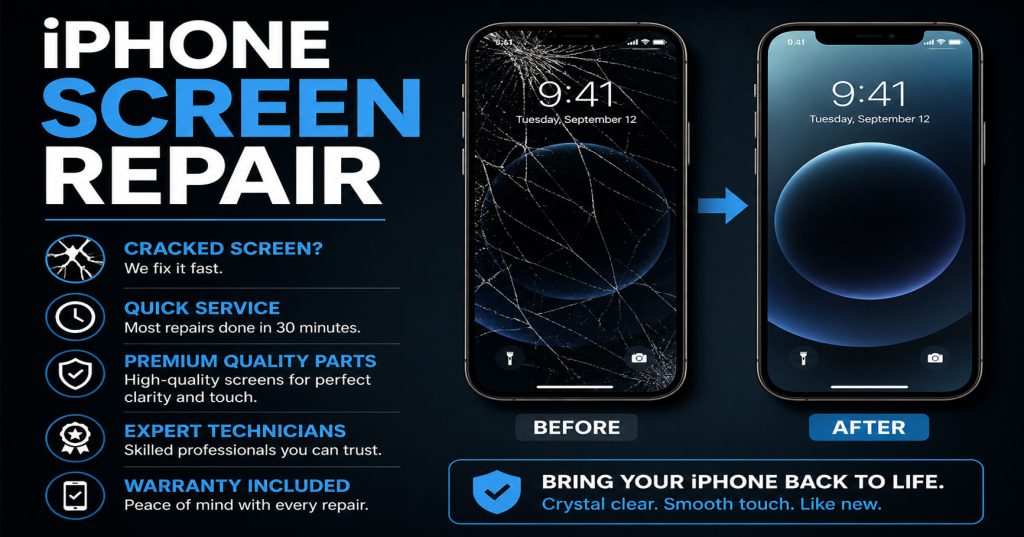
iPad Screen Repair: Apple Store vs Independent Repair Shop — Which Should You Choose?

When your iPad screen cracks, you’ve broadly got two choices: book in with Apple, or visit a local independent repair shop. Both can do a good job, but they differ in ways worth knowing before you decide.

Turnaround time. Apple Store appointments often need to be booked days in advance, and repairs are frequently sent away to a service centre, meaning you could be without your iPad for several days. Independent shops like Phone Heroes typically repair iPad screens on the spot, the same day, with no appointment needed.

Cost. Apple’s official pricing is generally higher, particularly for iPad Pro models, and rises further if your device is out of warranty or AppleCare+. Independent repairers often use quality, properly sourced parts at a noticeably lower price point.

Convenience. You don’t need to book ahead at most repair shops — simply walk in. Apple Store appointments, by contrast, can be hard to come by at short notice, especially at busy London stores.

Parts and warranty. Apple only fits genuine Apple parts, which matters to some owners, particularly with newer Face ID-equipped iPads. Reputable independent shops use high-quality alternative parts and back every job with their own warranty — at Phone Heroes, that’s a full year on parts and labour.

Older models. Apple eventually stops offering repairs for older iPads once they’re classed as “obsolete,” sometimes leaving owners with no official option at all. Independent repair shops, including Phone Heroes, continue supporting older iPads — from the original iPad Mini right through to the latest Pro — long after Apple has moved on.

There’s no single right answer — it depends on what matters most to you. But for most people, an independent specialist offers a faster, more affordable, and more flexible alternative without compromising on quality. At Phone Heroes in Earl’s Court, we repair every iPad model, with free diagnosis, same-day turnaround in most cases, and a one-year warranty as standard. Call 020 3397 7407 or visit phoneheroeslondon.co.uk to find out more.
Dropped Your iPad in Water? Do These 5 Things in the Next 10 Minutes

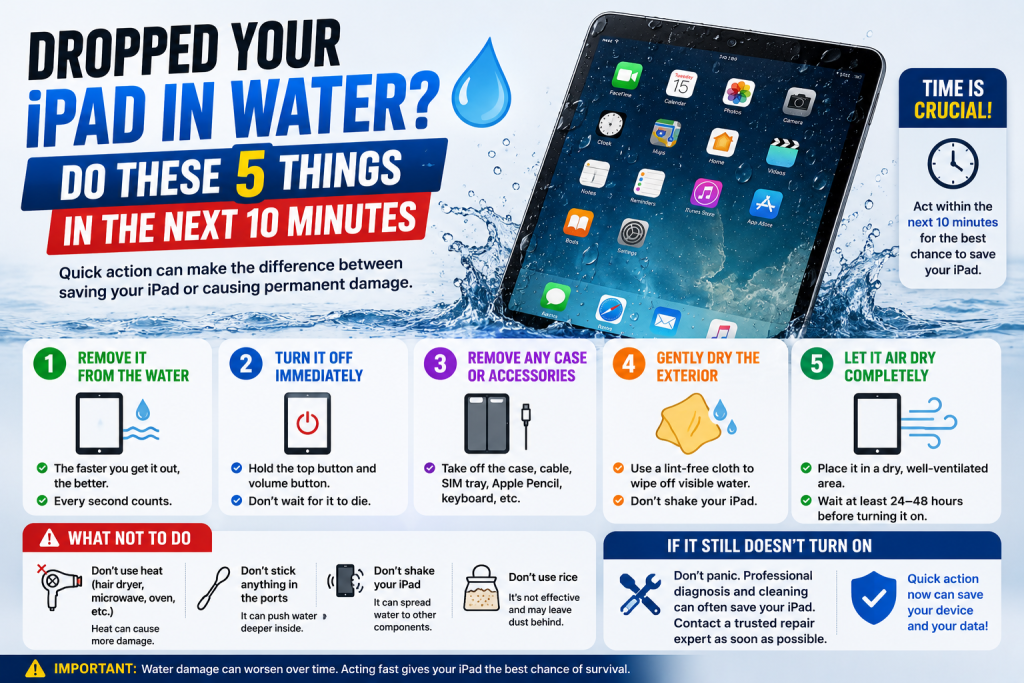
Spilled a drink near your iPad, or had it land in a puddle, the bath, or a sink full of washing up? Unlike many iPhones, most iPads aren’t water resistant, so what you do in the next few minutes really does matter. Here’s the right way to respond.

  1. Get it out of the water immediately and power it off. Don’t try to check if it still works — the longer it stays powered on with moisture inside, the greater the risk of a short circuit damaging the logic board.
  2. Don’t charge it, and don’t press any buttons unnecessarily. Plugging in a charger while the device is wet is one of the fastest ways to cause irreversible internal damage. Avoid pressing the home button or power button repeatedly to “check” it.
  3. Dry the outside thoroughly with a soft cloth. Pay particular attention to the speaker grilles, charging port, and any buttons, gently dabbing rather than rubbing or pushing moisture further inside.
  4. Skip the rice, and skip a hairdryer. Rice doesn’t draw out moisture from sealed gaps the way people assume, and warm air from a hairdryer can push liquid further into the device or melt internal components. Leaving it somewhere dry and at room temperature is safer than either.
  5. Get it to a repair shop as soon as you can. The sooner a technician opens the device and cleans the internals professionally, the better the chance of stopping corrosion before it spreads to the battery, logic board or connectors.

Liquid damage gets worse the longer it’s left untreated, even if your iPad seems to power back on briefly the next day — minerals left behind by the water continue to corrode components over time. At Phone Heroes in Earl’s Court, we offer a thorough liquid damage clean and diagnosis for all iPad models, with no obligation to proceed until you know the full picture. Call 020 3397 7407 or visit phoneheroeslondon.co.uk

iPad Won’t Charge? 6 Things to Check Before You Book a Repair

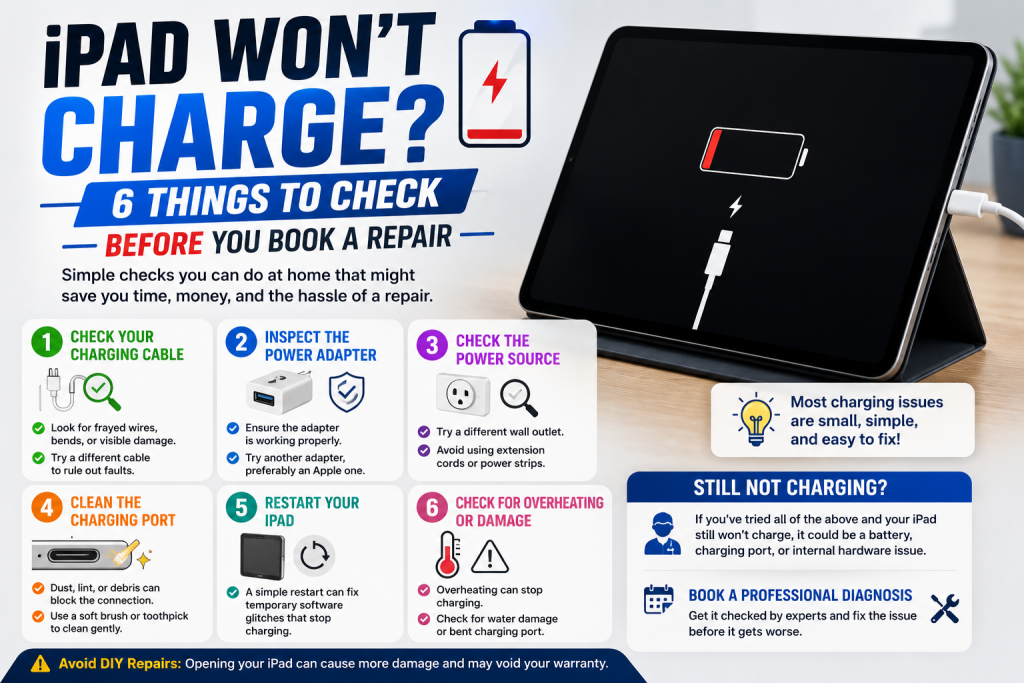
A few minutes of troubleshooting can sometimes save you a trip to the repair shop — and if it doesn’t, it’ll help our technicians diagnose the fault faster. Before you assume the worst, work through these six checks.

  1. Try a different cable and adapter. Cables fray internally long before they look damaged on the outside, and this is genuinely the most common reason an iPad appears to have stopped charging.
  2. Inspect the charging port for debris. Pocket lint and dust build up inside Lightning and USB-C ports over time and can physically block the connector from making contact. A soft brush or a wooden toothpick (never metal) can sometimes clear it gently.
  3. Try a different power outlet or socket. It sounds obvious, but a faulty wall socket or extension lead is an easy thing to overlook when you’re focused on the iPad itself.
  4. Restart your iPad. Hold the top button and either volume button (or just the top button on older models) until the slider appears, then power back on. Occasionally a charging fault is software-related and clears after a restart.
  5. Check for a “Liquid Detected” warning. Newer iPads will refuse to charge and show an alert if moisture is detected in the port, even from humidity rather than an obvious spill. Leave it somewhere dry for a few hours and try again.
  6. Look closely at the connector pins. If they appear bent, discoloured, or pushed in on one side, the port itself has likely failed and will need professional attention rather than a quick fix.

If you’ve worked through all of the above and your iPad still won’t charge, the fault is most likely the charging port itself, the battery, or the connector cable inside the device — all repairable. At Phone Heroes in Earl’s Court, we diagnose charging faults for free and most port or battery repairs are completed the same day, backed by a one-year warranty. Call 020 3397 7407 to book.


iPad Screen Cracked? Here’s What You Should Do Next (And What to Avoid)

A cracked iPad screen is one of those moments that ruins your day — a single drop and suddenly you’ve got a spider-web of cracks across the glass. Before you panic or reach for a DIY fix, here’s what’s actually worth doing, and what to steer clear of.

Do stop using it straight away. Continuing to tap and swipe on cracked glass can push small shards further into the digitizer or LCD beneath, turning a glass-only repair into a much more expensive full screen replacement.

Do check if the touchscreen still works. If the display lights up and responds to touch, the damage is likely limited to the glass. If areas have gone unresponsive, dark, or are showing odd colours or lines, the LCD itself may also be affected.

Do cover it for transport. A strip of clear tape over the worst of the cracks will stop glass fragments from coming loose in your bag and reduce the risk of cutting yourself while carrying it to be repaired.

Avoid pressing on the cracks to “test” them, and avoid using a case or screen protector to disguise the damage and keep using it — pressure and moisture can both work their way into a damaged screen and cause further internal damage over time.

Avoid cheap online repair kits. Many require you to fully remove the original adhesive seal and battery connector, and a botched DIY attempt is one of the most common reasons we see iPads arrive in a far worse state than when the screen first cracked.

Avoid waiting too long. Dust and moisture can creep in through even a small crack, eventually affecting the battery or logic board underneath — so the longer it’s left, the higher the risk of additional damage.

At Phone Heroes, we replace cracked iPad screens across every model — from the original iPad Mini through to the latest iPad Pro — usually within the same day. Every repair is backed by a one-year warranty and uses quality parts. Visit us at the Warwick Road entrance of Earl’s Court Underground Station, or call 020 3397 7407 to book.

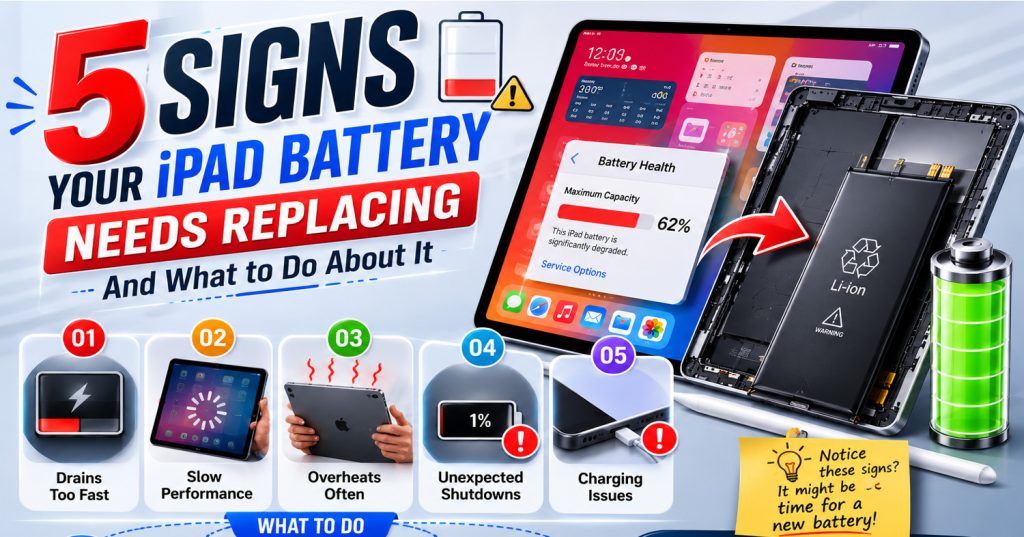
5 Signs Your iPad Battery Needs Replacing (And What to Do About It)

Your iPad is one of the most-used devices in the house — for work, school, streaming or just browsing on the sofa. But no matter which model you own, the battery inside will degrade over time, and unlike the iPhone, iPads don’t show you a battery health percentage in Settings. Here are five clear signs yours needs replacing.

  1. It drains far faster than it used to. If your iPad used to last a full day and now needs charging by lunchtime, the battery has lost a meaningful chunk of its original capacity. This is the single most common complaint we hear at our Earl’s Court repair shop.
  2. It shuts down with charge still showing. A tired battery can struggle to deliver power consistently, so your iPad may switch itself off even when the screen still shows 20% or more remaining. This is a strong sign the cells inside are nearing the end of their life.
  3. The case feels warm or slightly swollen. A battery that’s beginning to expand is a safety issue, not just a performance one. If the back panel bulges, the screen lifts at the edges, or the device feels warm during light use, stop charging it and get it checked straight away.
  4. Charging takes far longer than before. Worn batteries often take hours longer to reach full charge, and some plateau at 80–90% no matter how long they’re left on the charger. If overnight charging has slowed right down, the battery is the likely cause.
  5. Performance feels sluggish for no clear reason. A failing battery can’t always supply the power newer apps and updates demand, leading to lag, stuttering, or apps closing unexpectedly — symptoms many people mistake for their iPad simply getting old.

At Phone Heroes in Earl’s Court, we replace iPad batteries on most models the same day, using quality parts backed by a full one-year warranty. Not sure if it’s actually the battery? Walk in for a free diagnosis and our technicians will give you an honest answer before any work begins. Call 020 3397 7407 or visit phoneheroeslondon.co.uk to book.

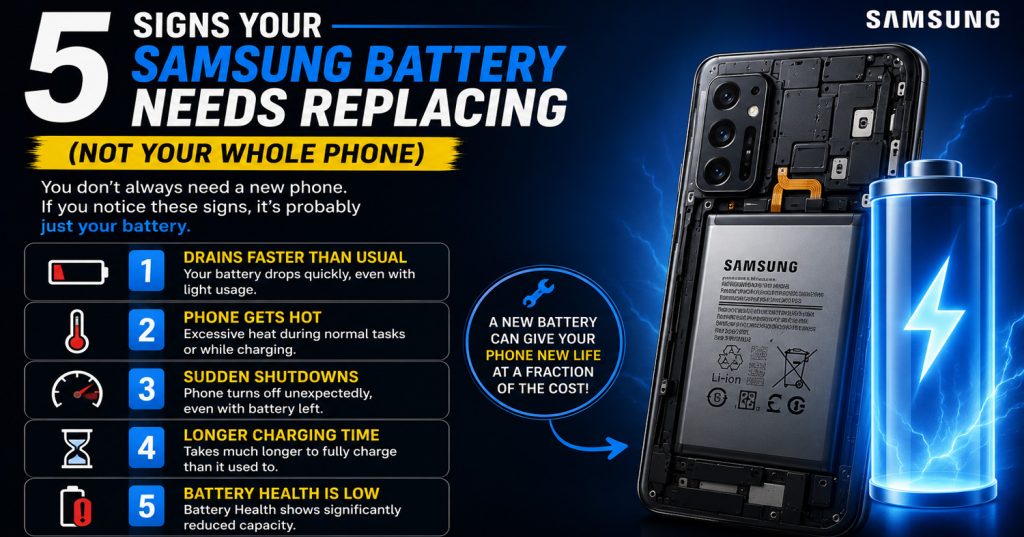
5 Signs Your Samsung Battery Needs Replacing (Not Your Whole Phone)

It’s one of the most common conversations we have at Phone Heroes. Someone comes in ready to buy a new Samsung, convinced their current phone is on its last legs. Nine times out of ten, the phone is perfectly fine — it’s just the battery that needs replacing.

Battery degradation is a normal part of owning a smartphone. Every lithium-ion battery has a finite number of charge cycles, and after a couple of years of daily use, performance starts to slip. The good news is that a battery replacement is one of the quickest and most affordable repairs you can have done — and it can make a phone that feels sluggish and unreliable feel brand new again.

Here are five clear signs that your Samsung battery needs replacing.

1. Your Phone Dies Long Before the End of the Day

If your Samsung used to easily last a full day on a single charge but is now dead by mid-afternoon — even with normal use — battery degradation is almost certainly the cause. As a battery ages, its capacity to hold a charge reduces. A battery that once had 4,000mAh of capacity might only be delivering 2,500mAh after two years of heavy use. No amount of turning off Background App Refresh or lowering screen brightness will fix a battery that can no longer hold a meaningful charge.

2. The Battery Percentage Drops Suddenly

Does your Samsung show 40% battery and then drop to 15% within minutes? Or does it shut down unexpectedly while still showing charge remaining? This is a classic sign of a degraded battery that can no longer accurately report its own charge level. The battery management system relies on the battery performing within expected parameters — when it can’t, the readings become unreliable and the phone shuts down to protect itself.

3. The Phone Gets Unusually Hot During Charging or Use

All phones produce some heat during charging and processor-intensive tasks. But if your Samsung is getting noticeably hot — not just warm — during normal use or while on the charger, the battery may be working harder than it should to compensate for reduced capacity. In some cases, excessive heat during charging can also indicate a problem with the charging dock rather than the battery itself, so it’s worth getting both checked.

4. The Phone Takes Much Longer to Charge Than It Used To

A significantly longer charging time — particularly if you’re using the same charger and cable as always — can indicate a deteriorating battery. As cells degrade, they can struggle to accept a charge at the normal rate. If you’ve already ruled out a faulty cable and the problem persists, the battery is the most likely culprit.

5. The Back of Your Phone Looks Slightly Raised or Bulging

This one is urgent. If the back of your Samsung has started to bow outwards or the screen is being pushed away from the body slightly, stop using the phone immediately and bring it in for repair. A swollen battery is a sign of internal gas build-up and poses a genuine safety risk. Do not attempt to charge a phone with a swollen battery. At Phone Heroes, we can safely remove and replace a swollen battery — but please do not delay if you notice this symptom.

How Long Does a Samsung Battery Replacement Take?

At Phone Heroes London, a Samsung battery replacement typically takes around 45 minutes. We carry stock for a wide range of Samsung models — from the Galaxy S-series through to the A-series and J-series — and we use quality replacement batteries that come with our standard One-Year Warranty.

It’s a fraction of the cost of a new phone, and in most cases, once the battery is replaced, the device performs just as well as it did when it was new.

Still Not Sure? Come In for a Free Diagnosis

If you’re not certain whether the issue is the battery or something else, bring your Samsung into our Earl’s Court store. Our technicians will carry out a free diagnosis and let you know exactly what’s wrong before recommending any repair. No hidden charges, no pressure — just honest, expert advice.

We’re open 7 days a week. Call us on 020 3397 7407 or use our online booking form to reserve a time that suits you.

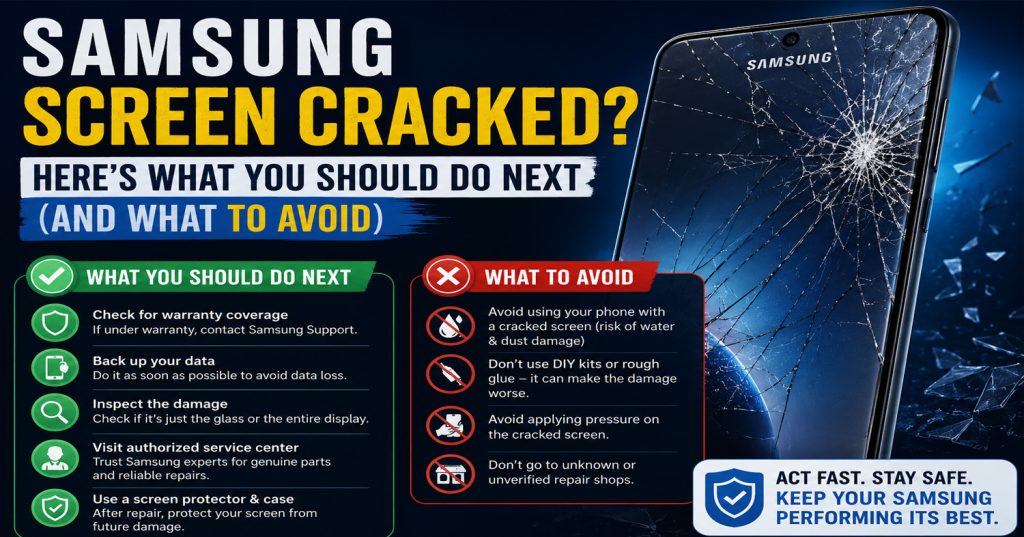
Samsung Screen Cracked? Here’s What You Should Do Next (And What to Avoid)

It happens faster than you’d expect. Your Samsung slips from your hand, bounces off the corner of a desk, and you pick it up to find a spider’s web of cracks spreading across the display. It’s one of the most frustrating things that can happen to a phone you rely on every single day.

Before you panic — or make the mistake of rushing to the nearest repair shop without thinking it through — here’s exactly what you should do, and what you should avoid, when your Samsung screen cracks.

Step 1: Don’t Keep Using It on a Cracked Screen

This sounds obvious, but most people carry on using their phone as normal after a crack appears. The problem is that a cracked screen isn’t just a cosmetic issue. Over time, pressure from normal use can cause the crack to spread, allow moisture to get in, and — in some cases — damage the AMOLED display beneath. What starts as a hairline crack can quickly turn into a full display replacement job.

If the crack is minor and the screen is still responding normally, try to minimise use until you can get it repaired. If the screen has gone dark, is flickering, or is unresponsive in places, get it looked at straight away.

Step 2: Back Up Your Data Immediately

Before you hand your Samsung to anyone for repair, back up your photos, contacts and important files. Most Samsung devices support backup via Samsung Cloud or Google Drive — you can set this up in Settings > Accounts and Backup. If the screen is badly damaged and you can’t navigate the menus, Samsung’s Smart Switch app (installed on a PC or Mac) can still access and back up the phone via USB even with a cracked screen.

This step is critical. A reputable repair shop will not touch your personal data, but it’s always sensible to have a backup in place before any repair work begins.

Step 3: Understand What You Actually Need — Screen, LCD, or Both?

There’s an important distinction between a cracked glass layer and a damaged AMOLED or LCD panel underneath. If your display still shows a clear image and responds to touch normally, it’s likely just the outer glass that’s cracked — and this is a relatively straightforward and affordable fix. If you’re seeing black patches, colour bleed, lines across the display, or areas that don’t respond to touch, the display panel itself is damaged.

At Phone Heroes London, our technicians will assess your Samsung screen in-store and give you a clear diagnosis before any work begins — so you know exactly what you’re paying for.

Step 4: Avoid DIY Repair Kits

YouTube makes Samsung screen replacement look deceptively simple. In reality, modern Samsung devices — particularly the S-series and A-series — use high-quality AMOLED panels that are tightly integrated with the chassis. Getting the screen off without the right tools and experience frequently results in further damage to the display, the adhesive seal, or the waterproofing. A repair that started as a £80 job can turn into a £200 job very quickly.

Unless you’re experienced with phone repairs, leave it to a professional. You’ll almost certainly save money in the long run.

Step 5: Choose a Repair Shop That Offers a Warranty

Not all repair shops are equal. When choosing where to take your Samsung, always ask about the warranty on parts and labour. At Phone Heroes London, every Samsung screen repair comes with our One-Year Warranty as standard. We use quality replacement parts and our technicians are experienced across the full Samsung range — from the Galaxy S-series to the A-series and J-series.

Most Samsung screen repairs at Phone Heroes take around one hour, and we offer a walk-in service as well as a same-day courier option across London. You don’t need to be without your phone for days.

The Bottom Line

A cracked Samsung screen is stressful, but it’s one of the most common and fixable phone problems we see every day. The key is to act quickly, back up your data, and find a trusted repair shop that uses quality parts and offers a warranty. If you’re in or around London, bring your Samsung into Phone Heroes at Earl’s Court and one of our technicians will have it assessed in minutes.

Call us on 020 3397 7407 or book online — we’re open 7 days a week.

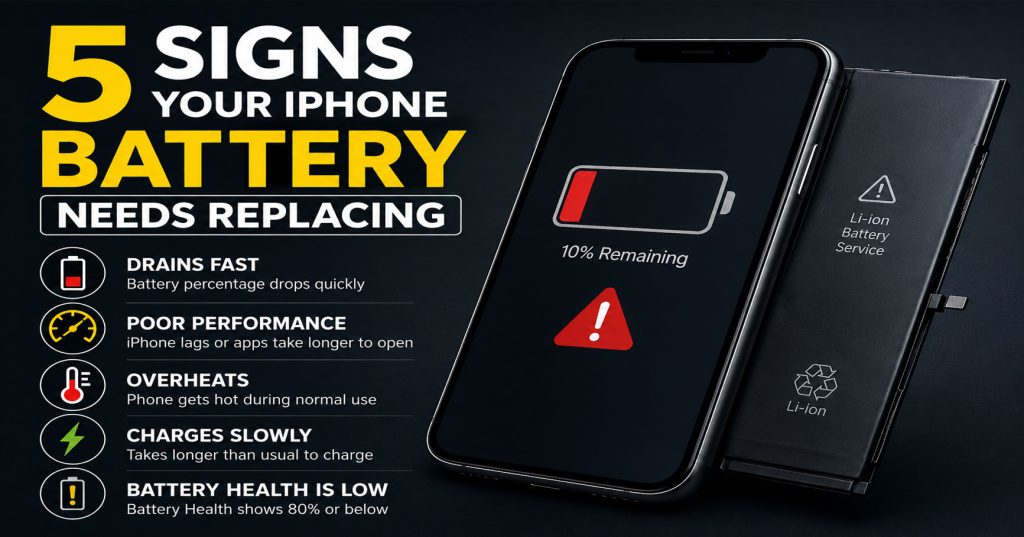
5 Signs Your iPhone Battery Needs Replacing (And What to Do About It)

5 Signs Your iPhone Battery Needs Replacing (And What to Do About It)

Your iPhone is one of the most important tools you carry every day. But no matter which model you own — whether it’s an iPhone 14, iPhone 15 Pro, or the latest iPhone 16 — the battery will degrade over time. Apple designs iPhone batteries to retain up to 80% of their original capacity after 500 full charge cycles. After that, performance can drop noticeably.

The good news? A battery replacement is one of the most affordable and impactful repairs you can make. At Phone Heroes in Earl’s Court, we replace iPhone batteries in as little as 30 minutes — and your phone will feel like new again.

Here are five clear signs that your iPhone battery needs replacing.

1. Your iPhone Is Draining Much Faster Than It Used To

This is the most common complaint we hear at our Earl’s Court repair shop. If your iPhone used to last all day on a single charge but now needs a top-up by early afternoon, that’s a strong indicator that your battery health has declined.

To check your battery health, go to Settings > Battery > Battery Health & Charging. If the maximum capacity reading is below 80%, Apple itself recommends a replacement. Anything below 85% and you’re likely already noticing reduced performance.

A degraded battery won’t just drain faster — it can also cause your iPhone to run warmer than usual and trigger unexpected behaviours across apps.

2. Your iPhone Shuts Down Unexpectedly — Even With Battery Remaining

One of the most frustrating symptoms of a failing battery is your iPhone powering off suddenly — even when it shows 20%, 30%, or more battery remaining. This happens because an aged battery can no longer deliver the peak power that the iPhone’s processor demands under load.

When the battery can’t sustain the power draw, your iPhone shuts itself down as a protective measure. If this is happening to you regularly, a battery replacement is almost certainly the solution.

This issue tends to get worse in cold weather, when battery chemistry performs less efficiently — another sign the cells are past their best.

3. Your iPhone Is Slower Than It Used to Be

Apple introduced a feature called performance management, which automatically reduces your iPhone’s processor speed to prevent unexpected shutdowns caused by an ageing battery. While this protects the hardware, it means your phone may feel sluggish — apps take longer to open, animations stutter, and the camera is slower to respond.

Many people assume their iPhone is just getting old and start thinking about an upgrade. In many cases, a simple battery replacement is all that’s needed to restore full speed and responsiveness. At Phone Heroes, customers are often amazed at how much faster their phone feels after a battery swap.

You can check whether performance management is active on your device by going to Settings > Battery > Battery Health & Charging and looking for any performance management notices.

4. Your iPhone Gets Unusually Hot During Normal Use

It’s normal for your iPhone to get slightly warm during intensive tasks — gaming, video calls, or using GPS for long periods. But if your device regularly feels hot during everyday tasks like browsing, messaging, or streaming, the battery may be to blame.

An ageing lithium-ion battery has to work harder to deliver the same power output, generating more heat in the process. Excessive heat can also accelerate the degradation of other components over time — so it’s worth addressing sooner rather than later.

If your iPhone is running warm alongside any of the other symptoms on this list, a battery replacement should be your first step.

5. Your Battery Health Is Below 80% — Even If You Haven’t Noticed Symptoms Yet

Sometimes battery degradation is gradual enough that you adapt to it without realising. You start charging more frequently, you carry a portable power bank, or you just accept that your phone doesn’t last as long as it used to.

If you check your Battery Health and see a reading below 80%, we’d recommend replacing the battery even if you haven’t noticed dramatic symptoms yet. Proactive replacement means you won’t be caught short during a busy day — and it’s far cheaper than buying a new phone.

At Phone Heroes in Earl’s Court, iPhone battery replacements start from £39 and take around 30 minutes. We use high-quality replacement batteries and back every repair with a one-year warranty.

How to Get Your iPhone Battery Replaced at Phone Heroes

Getting your battery replaced couldn’t be simpler. Our repair shop is located at the Warwick Road Entrance of Earl’s Court Underground Station — right in the heart of West London, convenient for commuters, residents, and anyone passing through Kensington or Chelsea.

There’s no need to book an appointment. Walk in during opening hours, hand over your iPhone, and in around 30 minutes you’ll have a fresh battery — backed by our one-year warranty. We replace batteries on all iPhone models from iPhone 6 through the latest iPhone 17 series.

Not sure if your battery needs replacing? Walk in for a free battery health check. Our technicians will assess your phone at no charge and give you an honest recommendation. If a replacement isn’t needed, we’ll tell you.

Call us on 020 3397 7407 or visit phoneheroeslondon.co.uk to find out more.

iPhone Screen Repair: Apple Store vs Independent Repair Shop — Which Should You Choose?

iPhone Screen Repair: Apple Store vs Independent Repair Shop — Which Should You Choose?

Cracking your iPhone screen is one of those moments that instantly ruins your day. Within seconds, you’re weighing up your options — and the two you’re most likely to consider are the Apple Store and an independent repair shop.

Both have their merits. But which is actually the better choice for most people? At Phone Heroes in Earl’s Court, we’ve repaired thousands of iPhone screens — and we want to give you an honest, balanced answer so you can make the right decision for your situation.

Here’s how the Apple Store and an independent repair shop compare across the five factors that matter most.

1. Cost — How Much Will You Pay?

This is usually where the difference is most stark. Apple charges premium prices for screen repairs, particularly on newer models. An out-of-warranty iPhone 15 Pro screen repair at the Apple Store can cost upwards of £300. For an iPhone 16 Pro Max, that figure can exceed £400.

At an independent repair shop like Phone Heroes, iPhone screen repairs start from £49 for older models, and even repairs on current flagship devices are significantly less expensive than Apple’s out-of-warranty pricing.

The exception is if you have AppleCare+, which reduces Apple’s repair fees considerably — sometimes to as little as £25. If you have an active AppleCare+ plan, the Apple Store becomes much more competitive on price.

For the majority of iPhone owners without AppleCare+, an independent repair shop offers dramatically better value.

2. Speed — How Long Will You Wait?

Apple Store appointments are typically booked days in advance — sometimes a week or more if your local store is busy. Once you’re in, the repair itself may take several hours or require you to leave your phone overnight.

At most independent repair shops, you can walk in without an appointment and have your screen replaced in 30 to 60 minutes. At Phone Heroes in Earl’s Court, the majority of iPhone screen replacements are completed while you wait — often in under an hour.

If you need your phone back quickly and can’t afford to wait for an Apple Store slot, an independent repair shop is almost always the faster option.

3. Parts Quality — Will the Repair Be as Good?

This is the question people ask most often — and it deserves a straight answer. Apple uses original Apple-manufactured screens, which do offer some technical advantages, particularly around True Tone calibration and Face ID compatibility.

Reputable independent repair shops use high-quality aftermarket or OEM-equivalent panels that deliver excellent display performance in everyday use. The difference in real-world quality between a good aftermarket screen and an Apple original is often indistinguishable to most users.

Where quality can vary is between repair shops — not all independents use the same grade of parts. At Phone Heroes, we use premium-quality screens and are transparent about the options available to you. We’ll always tell you what grade of screen is being fitted and what to expect.

The key is to choose a repair shop with a track record of quality and a warranty to back it up.

4. Warranty — What Happens If Something Goes Wrong?

Apple provides a 90-day warranty on its out-of-warranty repairs — covering only the repair itself, not any unrelated issues.

At Phone Heroes, every screen repair comes with a one-year warranty as standard — more than four times the coverage Apple provides on out-of-warranty fixes. If the same issue returns within 12 months of your repair, we fix it at no charge.

For most customers, a one-year warranty from a trusted local repair shop provides more than adequate peace of mind — and better protection than Apple’s own terms on paid repairs.

5. Convenience — Which Is Easier to Access?

The nearest Apple Store to Earl’s Court is in Covent Garden or Westfield Shepherd’s Bush — both requiring travel, a booked appointment, and significant time out of your day.

Phone Heroes is located at the Warwick Road Entrance of Earl’s Court Underground Station — one of West London’s most accessible locations. If you live or work in Kensington, Chelsea, Fulham, Hammersmith, or anywhere nearby, we’re easy to reach without going out of your way.

Walk in during opening hours and you’ll be back on your way with a repaired phone in under an hour — no appointment, no travel across London, no waiting.

So — Which Should You Choose?

Choose the Apple Store if you have AppleCare+ (the reduced price makes it excellent value) or if your iPhone is still under its original one-year Apple warranty.

Choose an independent repair shop like Phone Heroes if your iPhone is out of warranty, you need your phone repaired quickly, or you want a high-quality repair at a fair price without trekking across London.

At Phone Heroes in Earl’s Court, we’ve built our reputation on delivering repairs that last — with honest pricing, premium parts, and a one-year warranty on everything we touch. Call us on 020 3397 7407, visit phoneheroeslondon.co.uk, or simply walk in to our shop at Earl’s Court Station.

Dropped Your Phone in Water? Do These 5 Things in the Next 10 Minutes

Dropped Your Phone in Water? Do These 5 Things in the Next 10 Minutes

It happens in an instant. One moment your phone is fine, the next it’s at the bottom of the toilet, the kitchen sink, a puddle, or — the classic — a glass of water on the nightstand. Your heart sinks. You fish it out and stare at it, hoping for a miracle.

Here’s the truth: water damage is one of the most recoverable phone problems — but only if you act fast and do the right things. The next 10 minutes are critical. Here’s exactly what to do.

Why the First 10 Minutes Matter So Much

Water itself doesn’t fry your phone — the electricity passing through wet components does. The moment water bridges a circuit, it causes short circuits that permanently damage the logic board, charging circuits, and cameras. The faster you act to stop that process, the better your chances of saving the device.

Modern phones have water-resistance ratings (like IP67 or IP68), but these degrade over time and don’t cover submersion beyond test conditions. Don’t rely on it.

5 Steps to Take Immediately

1. Power it off straight away

This is the single most important step. If your phone is still on, hold the power button and switch it off immediately. Do not plug it in to check if it charges. Do not try to unlock it. Every second it’s powered on with water inside increases the risk of short-circuit damage.

If the screen is unresponsive and you can’t turn it off, hold the power and volume buttons simultaneously to force a restart or shutdown.

2. Remove the SIM card, case, and any accessories

Pop the SIM tray out and set it aside. Remove your case. Unplug any accessories like headphones or charging cables. The goal is to expose as many openings as possible to allow drainage and airflow.

If you have a phone with a removable battery (older Android phones), remove it immediately.

3. Gently dry the exterior — but avoid heat

Use a clean, dry cloth or paper towel to blot (not rub) moisture from the surface. Pay attention to the charging port, speaker grilles, and SIM slot. Tilt the phone gently to encourage any pooled water to drain out of the ports.

Do NOT use a hairdryer, oven, microwave, or any heat source. Heat warps internal components and causes more damage than the water itself.

4. Do NOT put it in rice — here’s why

The rice trick is one of the most persistent myths in phone repair. Rice is a poor desiccant — it absorbs very little moisture and does so very slowly. Worse, rice dust and starch particles can get inside your phone through the ports and cause additional problems.

If you want to use a desiccant, silica gel packets (the ones you find in shoe boxes and packaging) are significantly more effective. But ideally, skip the DIY drying entirely and get to a repair shop as fast as possible.

5. Get to a repair shop as quickly as you can

The professional treatment for water damage involves ultrasonic cleaning of the logic board and internal components — something you cannot replicate at home. The sooner a technician can clean and assess the internals, the higher the chance of full recovery.

At Phone Heroes, we offer water damage treatment for iPhones, Samsung devices, iPads, and other smartphones. Walk in — no appointment needed.

What Our Technicians Do for Water-Damaged Phones

When you bring a water-damaged phone to us, here’s what happens:

  1. We open the device and visually assess the damage, looking for corrosion, burn marks, and saturated components.
  2. We use an ultrasonic cleaner — a device that uses high-frequency sound waves in a cleaning solution to remove mineral deposits, corrosion, and residue from the board at a microscopic level.
  3. The board and components are dried in a controlled environment.
  4. We reassemble and test all functions — screen, cameras, speakers, microphone, Touch ID/Face ID, and charging.
  5. If specific components are damaged beyond recovery, we’ll tell you clearly and give options.

Can All Water-Damaged Phones Be Saved?

Honestly — not always. The outcome depends on how long the phone was submerged, what type of liquid it was (salt water and sugary drinks are more corrosive than clean water), and how quickly you acted.

Phones brought in within a few hours have the best outcomes. Phones that were left wet for days, or that were powered on repeatedly after getting wet, are harder to recover. But we’ve successfully revived devices that seemed completely dead — it’s always worth bringing it in for assessment.

We always give you a free diagnosis before quoting for any repair. If we can’t fix it, we’ll tell you honestly.

How Much Does Water Damage Repair Cost in London?

Costs vary depending on the extent of the damage and which components need attention. A diagnostic clean for a recently dropped phone typically starts from a reasonable flat fee. More complex repairs — where the charging board or camera has been damaged — will cost more. We’ll always give you a clear quote before starting any paid work.

Dropped your phone in water? Don’t wait. Walk into Phone Heroes, Earl’s Court Station — we’ll assess it immediately. +44 20 3397 7407