

The iPhone 7 has been a popular phone with Apple users, however, the only major difference between the iPhone 7 and previous iPhone generations is that there is no headphone jack. This means that you have to use the charging port for both functionalities. You are able to get special iPhone 7 headphones as well as adaptors in case you want to use your old headphones.
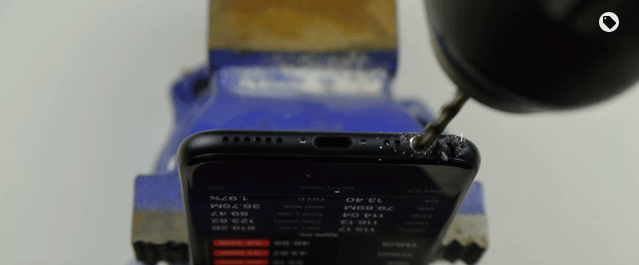
In our opinion, it’s a lot more hassle to buy new headphones or an adaptor to fit your own headphones. Lots of people seem to just go with it and don’t mind paying more for new headphones or an adaptor. However, one guy who is a YouTuber decided that he wanted a headphone jack in his iPhone 7 so he drilled his own one instead.
Whilst drilling the hole into the iPhone 7 it didn’t seem to affect the iPhone in any way as the screen was still showing an image while the hole was being drilled. Once the hole had been drilled apart from the roughness of the hole it looked in place and like it had been there all along. It did work although you could hear the music a lot so the sound didn’t all go to the headphones.
It was easy to create the headphone jack as all you needed was a drill. Anyone could do this to their iPhone 7 if they wanted to however, we would recommend not trying anything. Why would you want to waste a £500+ phone just for the sake of creating a headphone jack. There are many ways to resolve this issue by using special headphones for the iPhone 7, using an adaptor so that you can use your old headphones or even using Bluetooth headphones which will save you the hassle of having loads of wires. Being creative when it comes to being able to listen to music on the iPhone 7 doesn’t mean that you should ruin it. There are many tech accessories that can solve your problem for you and for a reasonable price as well!